Introduction
Every business faces a common challenge of planning, organising and optimally allocating the day-to-day operational tasks so that there is no delay and uneven workload distribution. However, managing all these activities manually becomes challenging as it is time consuming and complex. It leads to confusion, highly prone to human errors, delays or missed deadlines, inefficiency, difficulty in tracking task progress and uneven workload distribution.
To address these challenges, businesses started demanding for a technology-driven solution. Hence, task management software was developed to overcome these challenges. Businesses have positively reviewed this software and are highly satisfied with its impact on business productivity.
What is Task Management Software?
A task management software is an application that helps management create, assign, notify, modify, track, prioritize and review tasks assigned to each employee and ensures tasks are completed on time by clearly defining responsibility and maintaining transparency.
Each activity performed by employees is systematically recorded in the system which makes them accountable for delays or inappropriate behaviour.
In simple words, this software helps digitize the task management workflow to save time and cost, reduce errors, enhance employees’ productivity, and ensure on time delivery of products/services.
Why Do Businesses Need Task Management Software?
The software role is to notify and remind the employee about the task assigned, its due date and whom to report. Since everything is placed at a centralised platform, there is no confusion among employees with respect to their responsibilities.
Businesses need task management software due to following reasons -
Timely Notifications and reminders ensure that employees do not miss anything important and there is no delay in task completion.
- Improved Employees Productivity
This software doesn't let employees forget anything through constant reminders and providing clearly defined responsibilities, employees are more likely to complete the task on time.
- On-Time delivery of product/services
Software ensures on the time delivery of product and services by ensuring each employee performs their assigned task before the due date through constant review, feedback and alert.
This software automates and streamline workflow by planning, prioritising and distributing tasks to ensure a perfect workload balance among employees while ensuring urgent tasks are completed first.
With advanced features like Whatsapp and Email integration, review, feedback and commenting capabilities, instant notifications and periodical reminders it ensures effective communication and collaboration among employees.

Key features to Look for in top Task Management Software
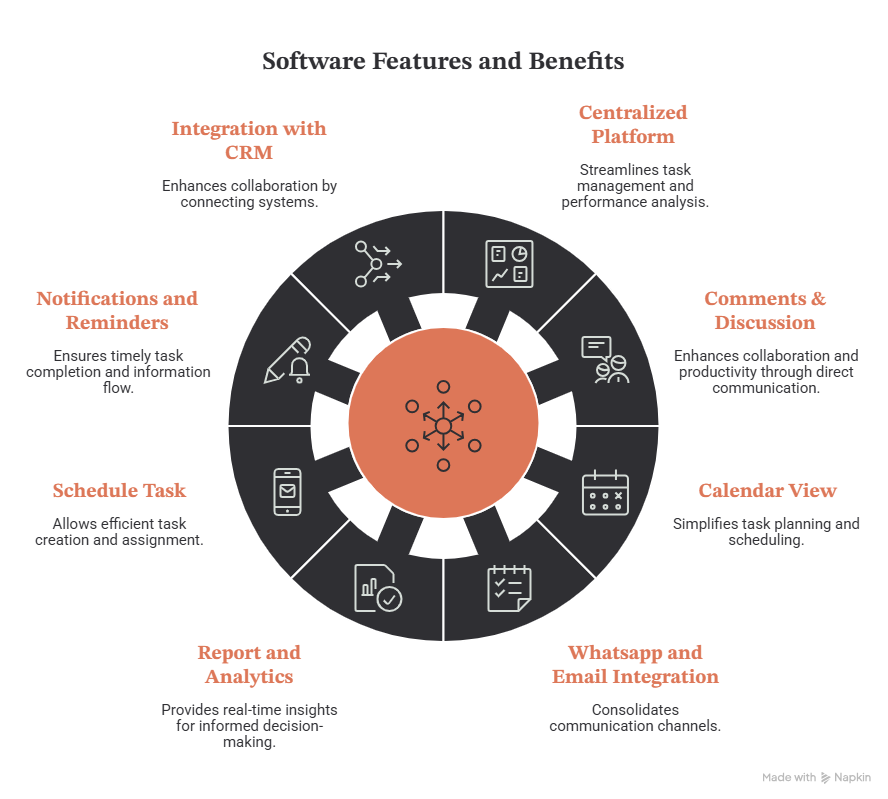
Business gets a centralized platform to manage all tasks and analyse employee’s performance. All tasks and sub tasks that are created, modified, or assigned are systematically recorded in one place. Feedbacks, reviews approval, and other activities related to assigned tasks are also maintained on the same platform making performance tracking and analysis easier, faster and more efficient.
The software allows employees to discuss and comment on tasks directly from the system to promote collaboration and communication among employees which will help enhance task performance by clarifying doubts and resolving issues and improves employee productivity.
Software provides advanced features such as calendar view where employees can create, assign, modify and schedule tasks directly from the calendar. This saves time, simplifies task planning and makes operation super easy and efficient.
Authorised employees can create tasks by defining the task clearly, its start date, due date and set priority. They can assign it to the team member and could review and send feedback periodically for improvement.
The software generates real-time reports and gives up-to-date information on current status of each task through interactive graphics and visual dashboard. This allows management to get quick insights into the current situation, identify delays, track progress and take necessary action if needed.
- Whatsapp and Email Integration
The software facilitates employees to communicate via email and whatsapps directly through the system. By integrating email and whatsapp via API, it brings and stores task based communications at a single platform, saving extra effort and time needed to switch between multiple applications.
- Notifications and Reminders
This feature keeps the employee updated and informed that ensures no crucial information is missed and the task is completed on time.
- Integration with existing CRM
This software can be integrated with your current CRM so that employee need not operate in two separate software at the time and everything can be brought together at a single place for better collaboration and communication.
Functions of a Task Management Software
A task management software perform all those functions needed to automate and simplify the task management process to enable business complete its goal within timeframe.
1. Create a New Project
Executives can initiate with creating a new project just in a few clicks.
- Click on + Add New Project button Fill all the project details like Project Name, Description, Start date, Due date, Budget etc. Click on Save.
- Create Tasks under that projects
- Next, team leaders/executives can add new tasks under a project in a few clicks.
2. Create a New Task
- Click on + Add New task button
- Fill all the necessary task details such as Task title, Description, Start date, Due date, Select project, notes and more.
- Click on Save.
3. Create sub-tasks under each task, if required
If needed, team leaders/executives can add sub tasks under an existing task with just a few clicks.
- Click on + Add Sub-task button
- Fill all necessary sub-task details such as Sub-task title, Description, Select Task etc.
- Click on Save.
5. Task Assignment
Executives can assign tasks to their respective team members provided with clear instructions, start date, due date and other required details to avoid ambiguity and ensure timely completion of tasks.
6. Notifications - Employees are notified when new task is assigned
The software automatically notifies employees when they are assigned a task, ensuring that they never miss an assignment. Once notified, employees can review the task details and start working on it promptly.
Each time an activity is performed, respective personnel are notified. For instance if subordinates update a task’s status, their supervisors are notified immediately, keeping everyone updated.
7. Real-time Task Status Update
Employees can update the task status based on their current progress. This provides real-time insights into the current status of each task to higher authorities empowering them to make timely and informed decision .
8. Task Review and Feedback by Team Leader
Team leaders/Supervisors can review their team members' task performance and provide feedback for further improvement, if needed. Otherwise they can approve the completed task.
Once this action is taken, the respective employee will be automatically notified and their portal is updated accordingly keeping them informed.
9. Employee Performance Analysis
Supervisors can analyse the performance of their team mates instantly by comparing their current task status against the targets assigned. Key performance parameters such as number of tasks completed on time, number of overdue tasks, previous feedback, reviews and approval, and other metrics can be used to analyse the quality of performance.
10. Alert and Reminders
Employees can set reminders so that they don’t forget any task or deadline which can help them achieve their goal on time. They can receive reminders via email, their portal or through SMS or on all three based on their personal notification preferences.
Which is the Best Task Management Software in India?
Eduzent’s Task Management Software is an ideal software to automate and streamline workflow in an organisation. The company has been in the industry for more than years serving all kinds of industries with their custom software solutions. They operate in Delhi NCR but serve businesses across nations. They also have a good MNCs client base.
Businesses can contact them for mobile app development both Android and iOs, custom software development or digital marketing services through enquiry form or email them your requirement. Their technical team calls back within hours. You can connect them on Whatsapp or through a call.
Why should businesses use Eduzent’s Task Management Software?
Businesses must opt for Eduzent’s task management software because it incorporates almost all essential features from basic to advanced. Apart from this Eduzent is open to customization, allowing businesses to add new functionalities according to their evolving needs.
They understand that every business is different, and so are their requirements, which means a standard software solution may not address every business unique challenges.That's why Eduzent welcomes changes and tailor its software to fit with specific needs of each business.
Other reasons to choose Eduzent are -
- Their software pricing is highly reasonable compared to other software providers.
- Their customer support services are highly reliable and responsive.
- They offer free annual maintenance charges for 6 months to 1 year based on terms.
- An impressive 4.9 Google Rating, which depicts a high customer satisfaction level.
Conclusion
Businesses can derive multiple benefits by effectively using a task management software to plan, organise and manage day-to-day tasks. The benefits include balanced workload distribution, fixing employees accountable, on-time work completion, improved overall productivity, reduced delays, optimized resource utilization and other benefits, if used wisely.
The cost of the software is much lower as compared to its potential advantage so it is a profitable deal for businesses to invest in it.
If you are looking for top task management software, contact Eduzent Infotech to schedule a free demo.
Contact Eduzent Via
Email - info@eduzent.org
Whatsapp/Call - 01206025035
Frequently asked questions
Quick answers to the most common questions about this topic.
Yes, the software company does provide free demo so that businesses could make informed decisions whether to buy the software or not.
The cost of the software varies from company to company. Factors that directly impact the cost of the software are number of features requirement, amount of customization required, number of licences needed. There are two ways to get access to this software. First one is the Licence model where companies pay monthly/annual charges per user while the second option is to buy the software by paying a lump-sum amount at once and you get full ownership of the software for life.
No, there are no other hidden charges to the software. Every software company charges an annual maintenance fee against the maintenance (to fix the bugs if any) of the software. This cost is charged only when software is purchased by businesses, not applicable in the case of licence model.
Yes, task management software is easy to install and use by the employees. One training session will be enough to train the client’s workforce and after that they can easily operate the software without any confusion.
The software ensures that employees perform all the tasks assigned to them on time which means no missed deadlines and no delay, which enables the company to achieve its target within the planned time and budget. The software tries to simplify the entire task management process by digitising every step and recording all the activities in a centralized database that helps in providing real-time visibility in task progress, current status and overall task performance. The software also helps identify employees responsible for delays, or project failure.